
COMPUTING · COMPARISON
ASUS ProArt P16 vs ProArt P14: which RTX Spark AI laptop suits creators?
 By S. Dahani and the RealDigitalTech editorial team
ASUS's ProArt P16 and P14 share Nvidia's RTX Spark chip and up to 128GB of memory. Here is what we know about screens, weight and price before full reviews.
© ASUS
Quick Take
Key figures
What ASUS announced at IFA 2026
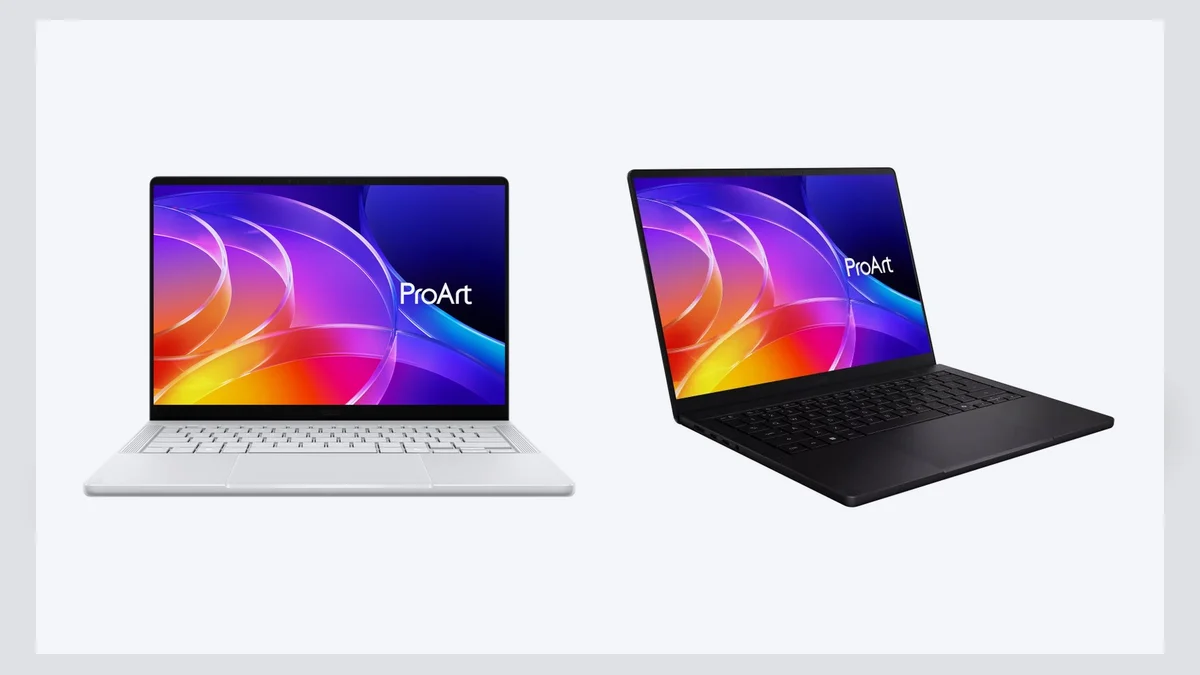
ASUS showed the ProArt P16 (H7607) and ProArt P14 (H7407) at IFA in Berlin in early September 2026, alongside the GR1X mini PC. All three are built on Nvidia's RTX Spark platform. ASUS's spec pages list the same chip in both laptops: the RTX Spark N1X, with a 20-core CPU and a 6,144-core Blackwell RTX GPU, sharing up to 128GB of LPDDR5X memory. ASUS claims up to one petaflop of AI performance.
The pitch is local AI for creators. ASUS bundles its own apps: MuseTree, which runs FLUX and WAN image models on the laptop, StoryCube for AI-assisted media organisation, and a workflow tool called Zenni Claw. If you would rather buy an AMD-based ProArt that has already been reviewed, see our ProArt PX13 analysis.
P16 vs P14: the differences
The chip is the same, so the choice comes down to screen size, weight, battery and storage.
| ProArt P16 | ProArt P14 | |
|---|---|---|
| Screen | 16-inch OLED, 3K or 4K (3840 × 2400), 120Hz | 14-inch 3K OLED (2880 × 1800), 120Hz, touch with stylus support |
| Brightness | Up to 700 nits SDR, 1,600 nits HDR (4K panel) | Up to 700 nits SDR, 1,600 nits HDR (top panel) |
| Memory | 24GB to 128GB | 24GB to 128GB |
| Storage | Up to 2TB, plus two PCIe 5.0 M.2 slots | 512GB or 1TB |
| Battery | 99.9Wh | 90Wh, 140W USB-C charger |
| Card reader | SD Express 7.0 | SD 4.0 |
| Weight and thickness | 1.77 kg, 12.9 to 15.9 mm | 1.48 kg, 13.9 to 15.9 mm |
Both have three 40Gbps USB4 Type-C ports, a 10Gbps USB-A port, HDMI 2.1, Wi-Fi 7 and an FHD IR webcam, according to ASUS's spec pages. The IFA press release instead mentions dual Thunderbolt 4 ports on the P16, so check final retail listings. ASUS says the P16 is 14% thinner and 9% lighter than its predecessor, and calls the P14 its lightest ProArt laptop yet.
First impressions
No full review was available at the time of writing, and no independent performance tests have been published. Tom's Guide's Jason England handled the P14 next to a MacBook Pro 14:
- Design: the dimensions are close to Apple's, but with a textured matte charcoal finish; it is slightly lighter, at 3.3 pounds against 3.4.
- Keyboard: deeper travel and a softer landing than the MacBook, which he enjoyed, though he warns it could tire some typists.
- Screen: the OLED panel suits colour grading indoors, while he expects the MacBook's mini-LED display to stay brighter outdoors.
- Trackpad: large and smooth, but he still prefers Apple's.
England also put the P14 in Tom's Guide's Best of IFA 2026 list, saying it could become his favourite machine if the price is right. Tom's Guide reports a $2,199 starting price for the 24GB P14. ASUS has not announced P16 pricing.
How they compare with Lenovo's RTX Spark Yoga laptops
Lenovo also announced two RTX Spark creator laptops at IFA 2026, with the same 20-core CPU and Blackwell GPU:
- Yoga Pro 9n: a 15.3-inch 2.5K OLED at up to 165Hz and 1,100 nits peak, up to 128GB of memory, up to 4TB of storage across two SSD slots, a 92.5Wh battery and a weight of 1.65 kg.
- Yoga 9n 2-in-1: a 16-inch 2.8K OLED at up to 120Hz, up to 64GB of memory and 2TB of storage, a 99.9Wh battery and 1.94 kg.
On paper, ASUS offers higher resolution and brightness (4K and 1,600 nits HDR on the P16), while Lenovo's Yoga Pro 9n has the faster refresh rate and sits between the two ProArts in weight. The Yoga 9n 2-in-1 is the convertible option but tops out at 64GB. Lenovo says pricing and availability will be announced later.
Verdict
Choose the P16 if you edit 4K video or work with large AI models and want the sharpest screen, more storage and the biggest battery. Choose the P14 if you travel often: it keeps the same chip and memory options in a lighter body. Either way, wait for full reviews. RTX Spark is a brand-new platform for Windows laptops, and battery life, fan noise and app compatibility are still untested. Our guide to personal AI PCs explains what to check before paying for local AI.
This article is based on ASUS's announcements and early hands-on coverage, in our own words. RealDigitalTech has not tested the ProArt P16 or ProArt P14 itself.
Sources
- ASUS Pressroom — ASUS Showcases ProArt PCs Powered by NVIDIA RTX Spark at IFA 2026
- ASUS — ProArt P16 (H7607) tech specs
- ASUS — ProArt P14 (H7407) tech specs
- Tom's Guide — I held the Asus ProArt P14 next to my MacBook Pro 14
- Tom's Guide — Best of IFA 2026: We found the 26 top new gadgets
- Lenovo StoryHub — Lenovo Expands the Yoga Portfolio with New AI PCs and Tablets Built for Creators
How this article was made: our editorial team selected and read the reviews listed above, compared their results and wrote this synthesis, with AI tools assisting the research and drafting. Every figure was checked against the sources, and the article was approved by the publication director. Our AI Disclosure · Our methodology · Report an error: editorial@realdigitaltech.com