TV · COMPARISON
Roku Streaming Stick Plus vs Google TV Streamer: which 4K streamer should you buy?
 By S. Dahani and the RealDigitalTech editorial team
The Roku Streaming Stick Plus costs about $35 and powers itself from your TV; the $149.99 Google TV Streamer adds Dolby Vision, Dolby Atmos, Ethernet and a smart home hub. Which streaming device fits your TV in 2026?
© Roku, Google
Quick Take
Key figures
A cheap stick against a premium box
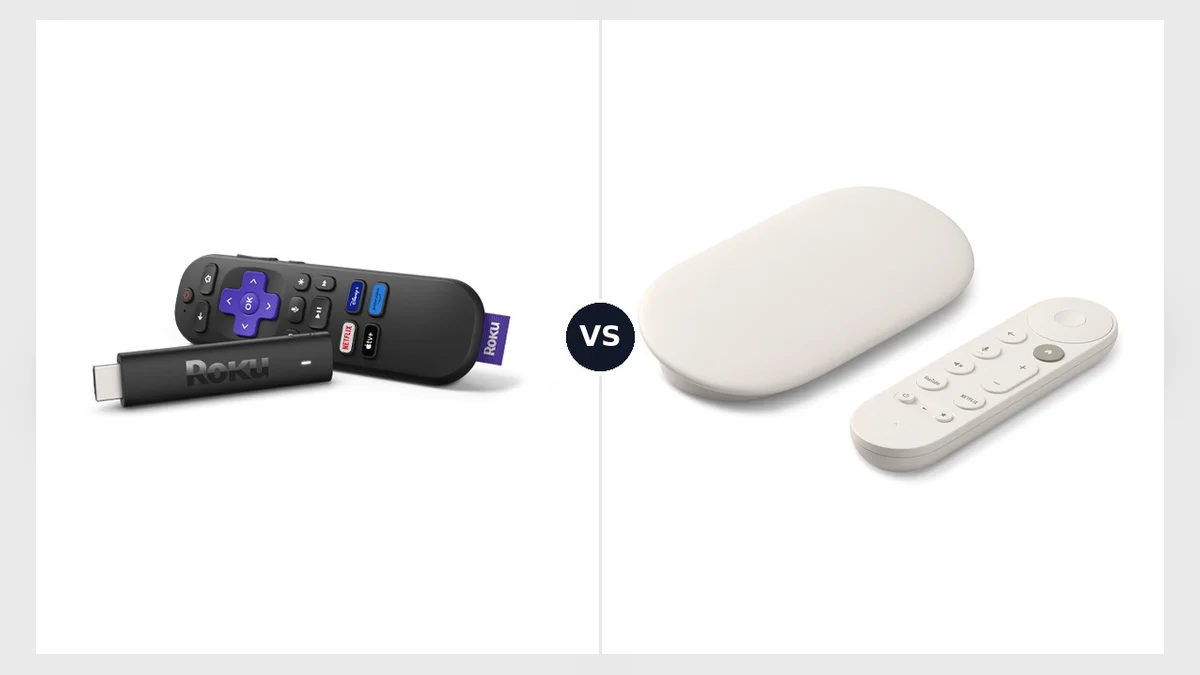
Both devices turn any TV with an HDMI port into a 4K smart TV, but they are very different products.
The Roku Streaming Stick Plus is a tiny dongle that plugs straight into the TV and draws its power from the TV's USB port, so there is no extra cable or plug. It replaced the Roku Streaming Stick 4K and is built for simplicity and price.
The Google TV Streamer, which replaced the Chromecast in September 2024, is a small wedge that sits next to the TV. It is more powerful, supports the best picture and sound formats and doubles as a smart home hub.
Specs compared
| Roku Streaming Stick Plus | Google TV Streamer | |
|---|---|---|
| Price | $39.99 list, about $34 on sale (October 2026) | $149.99 (launched at $99.99 in 2024) |
| Resolution | 4K at 60 fps | 4K at 60 fps |
| HDR | HDR10, HDR10+, HLG | Dolby Vision, HDR10, HDR10+, HLG |
| Dolby Atmos | No | Yes |
| Wi-Fi | Wi-Fi 5 | Wi-Fi 5 |
| Ethernet | No | Yes |
| Storage | Not stated | 32 GB |
| Power | TV USB port | Wall socket required |
| Smart home | Minimal (camera app) | Thread border router, Matter, Google Home panel |
| Software | Roku OS | Google TV |
Specifications and prices from Tom's Guide, Engadget and American TV.
Picture and sound: Google wins clearly
This is the most important difference for owners of a good TV. The Google TV Streamer supports Dolby Vision, the HDR format used by Netflix, Disney+ and Apple TV for most of their premium content, and Dolby Atmos for surround sound with a compatible soundbar. The Roku supports HDR10+ but not Dolby Vision, so Dolby Vision content plays in standard HDR10, and it does not output Atmos.
If your TV does not support Dolby Vision (many Samsung TVs, for example, use HDR10+ instead), this advantage disappears, and the Roku becomes much more attractive.
Speed and interface
Tom's Guide finds the Google TV Streamer much faster: menus and apps open without pauses, while the Roku sometimes hesitates or skips. Google TV gathers content from all your apps into one home screen, and its AI features summarize plots and critics' reviews and create custom screensavers from a text prompt.
Roku's interface is simpler and very easy for children and older users. Engadget praises its large catalogue of free and live channels and accurate universal search, but notes that the "What to Watch" menu mainly highlights free content.
Remote and installation
- Roku: the remote has dedicated buttons for Netflix, Disney+, Prime Video and Apple TV, plus voice control. The stick may not fit behind every TV, and no HDMI extender is included.
- Google: the remote has programmable buttons and a "find my remote" feature. The box needs its own power cable and, according to Engadget, the HDMI cable is sold separately.
Smart home
The Google TV Streamer's Ethernet port and Thread border router let it control Matter devices such as lights, locks and sensors, and a side panel shows your Google Home cameras and controls. The Roku offers almost nothing here. If you are building a smart home, see our smart home guide.
Which one should you buy?
- Your budget is tight, or it is for a second TV: the Roku Streaming Stick Plus.
- Your TV supports Dolby Vision, or you have an Atmos soundbar: the Google TV Streamer.
- You want the fastest interface and Ethernet for a stable connection: the Google TV Streamer.
- You travel and want a stick that runs from the TV's USB port: the Roku Streaming Stick Plus.
- You watch a lot of free TV channels: the Roku Streaming Stick Plus.
- You use Google Home or Matter devices: the Google TV Streamer.
Frequently asked questions
Does the Roku Streaming Stick Plus support Dolby Vision? No. It supports HDR10+, HDR10 and HLG.
Why did the Google TV Streamer's price rise? It launched at $99.99 in 2024 and is now listed at $149.99 in the US, like many devices affected by higher memory and component costs in 2026. It rarely goes on sale, according to Tom's Guide.
Do I need a subscription? No. Both devices are free to use; you only pay for the streaming services you choose.
What about Fire TV and Apple TV? Amazon's Fire TV Stick 4K sold for $29.99 during October deals, and the Apple TV 4K costs from $129. Both are good alternatives depending on your ecosystem.
Verdict
The Google TV Streamer is the better device: faster, with Dolby Vision, Dolby Atmos, Ethernet and a real smart home hub. It is the right choice for a main TV and a good sound system. The Roku Streaming Stick Plus is the better deal: at about a quarter of the price, it delivers 4K HDR, a simple interface and lots of free content, and it is perfect for a bedroom TV or a TV without Dolby Vision. If you are also changing your TV, read our TV buying guide and our Black Friday 2026 guide.
This article analyses comparisons and tests published by other outlets, in our own words. RealDigitalTech did not test the Roku Streaming Stick Plus or the Google TV Streamer itself. Prices are US prices at the time of writing.
Sources
- Tom's Guide — Roku Streaming Stick Plus vs Google TV Streamer: which streaming device is right for you? (May 16, 2025)
- Engadget — The best streaming devices for 2026 (updated January 13, 2026)
- American TV — Streaming stick deals this month: Roku vs Fire TV prices (October 2026)
- Tom's Guide — The best streaming devices we've tested
How this article was made: our editorial team selected and read the reviews listed above, compared their results and wrote this synthesis, with AI tools assisting the research and drafting. Every figure was checked against the sources, and the article was approved by the publication director. Our AI Disclosure · Our methodology · Report an error: editorial@realdigitaltech.com